A few suggestions for when you're on camera in ZOOM!

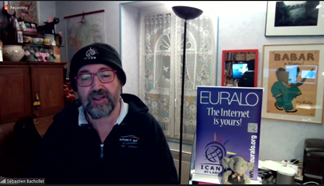
Folks, Glad we're getting started with our meetings. I think we're off to a strong start so thank you for everyone involved. I noticed a couple of things that I thought I would mention to improve your camera feed on Zoom. 1. Align your camera. Often people are using the camera on their laptop to broadcast themselves but when you do this, you need to be careful. The best angle for the laptop screen for reading might NOT be the best angle for you on camera. Often, when the lid is too far back, you will be too low on camera. Something to check. You can go into Video Settings on Zoom to see how you look on camera. 2. Use a Green Screen While clever, the virtual background feature of Zoom is not very good and can be quite distracting when people are seeing parts of you disappear and reappear on camera. IF you have a green screen, the virtual backgrounds will look MUCH better! If you do not have a green screen, I my strong recommendation is not to use a virtual background. I never thought I would write these words but follow Sébastien's example! He has simply created a nice space in his office, cleaned it up a bit, put up a sign, made it bright and it looks MUCH better than disappearing and reappearing. [A person standing in front of a computer Description automatically generated] If you really MUST use the virtual background feature, remember that it is using the difference in depth in your scene to determine what to include and not include. If possible, sit with a plain wall behind you, without a lot of extra stuff to confuse the camera and try to stay fairly still, so you remain the same distance to the camera. 1. Face the light. You'll notice also in Sébastien's example that he has a nice soft light on his face. When you have the brighter light behind you, you become a silhouette. Try to face a northern window or turn a light on in front of you, perhaps directing it at the wall in front of you if you're facing a wall. Ideally, the brightest source of light in you scene is in front of you and bigger than your head. Just some thoughts I wanted to share with all of you who might be "on camera" in the next couple of weeks. Once again, great start! Jonathan Jonathan Zuck Executive Director Innovators Network Foundation www.InnovatorsNetwork.org<http://www.InnovatorsNetwork.org>

Great suggestions, JZ. I already decided not to use that background as it does get a bit shapeshifty. Seb was very well set up. Marita On 10/13/2020 7:46 AM, Jonathan Zuck wrote:
Folks,
Glad we’re getting started with our meetings. I think we’re off to a strong start so thank you for everyone involved. I noticed a couple of things that I thought I would mention to improve your camera feed on Zoom.
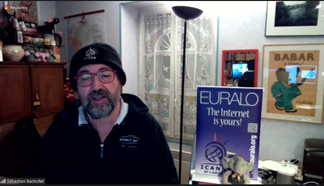
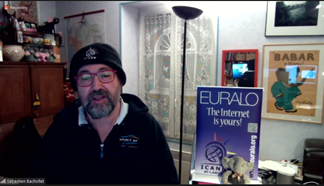
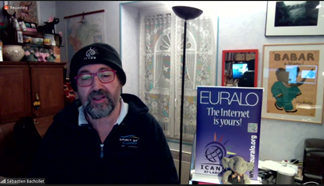
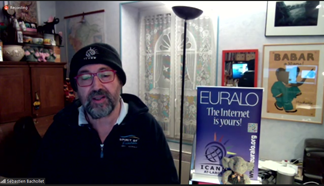
1. *Align your camera.* Often people are using the camera on their laptop to broadcast themselves but when you do this, you need to be careful. The best angle for the laptop screen for reading might NOT be the best angle for you on camera. Often, when the lid is too far back, you will be too low on camera. Something to check. You can go into Video Settings on Zoom to see how you look on camera. 2. *Use a Green Screen* While clever, the virtual background feature of Zoom is not very good and can be quite distracting when people are seeing parts of you disappear and reappear on camera. IF you have a green screen, the virtual backgrounds will look MUCH better! If you do not have a green screen, I my strong recommendation is not to use a virtual background. I never thought I would write these words but follow Sébastien’s example! He has simply created a nice space in his office, cleaned it up a bit, put up a sign, made it bright and it looks MUCH better than disappearing and reappearing. A person standing in front of a computer Description automatically generated
If you really MUST use the virtual background feature, remember that it is using the difference in depth in your scene to determine what to include and not include. If possible, sit with a plain wall behind you, without a lot of extra stuff to confuse the camera and try to stay fairly still, so you remain the same distance to the camera.
3. *Face the light.* You’ll notice also in Sébastien’s example that he has a nice soft light on his face. When you have the brighter light behind you, you become a silhouette. Try to face a northern window or turn a light on in front of you, perhaps directing it at the wall in front of you if you’re facing a wall. Ideally, the brightest source of light in you scene is in front of you and bigger than your head.
Just some thoughts I wanted to share with all of you who might be “on camera” in the next couple of weeks. Once again, great start!
Jonathan
*Jonathan Zuck*
/Executive Director/
Innovators Network Foundation
www.InnovatorsNetwork.org <http://www.InnovatorsNetwork.org>
_______________________________________________ At-Large mailing list At-Large@atlarge-lists.icann.org https://atlarge-lists.icann.org/mailman/listinfo/at-large
At-Large Official Site: http://atlarge.icann.org _______________________________________________ By submitting your personal data, you consent to the processing of your personal data for purposes of subscribing to this mailing list accordance with the ICANN Privacy Policy (https://www.icann.org/privacy/policy) and the website Terms of Service (https://www.icann.org/privacy/tos). You can visit the Mailman link above to change your membership status or configuration, including unsubscribing, setting digest-style delivery or disabling delivery altogether (e.g., for a vacation), and so on.

Thank you very much for your recommendations, Jonathan! It is very nice to see EURALO Chairman as the great example!-) I also ask you to share the source of the background with the dragons!!!-))))🐉 Best, Natalia F. вт, 13 окт. 2020 г. в 15:56, Marita Moll <mmoll@ca.inter.net>:
Great suggestions, JZ. I already decided not to use that background as it does get a bit shapeshifty. Seb was very well set up.
Marita On 10/13/2020 7:46 AM, Jonathan Zuck wrote:
Folks,
Glad we’re getting started with our meetings. I think we’re off to a strong start so thank you for everyone involved. I noticed a couple of things that I thought I would mention to improve your camera feed on Zoom.
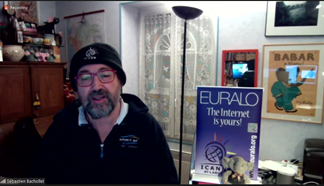
1. *Align your camera.* Often people are using the camera on their laptop to broadcast themselves but when you do this, you need to be careful. The best angle for the laptop screen for reading might NOT be the best angle for you on camera. Often, when the lid is too far back, you will be too low on camera. Something to check. You can go into Video Settings on Zoom to see how you look on camera. 2. *Use a Green Screen* While clever, the virtual background feature of Zoom is not very good and can be quite distracting when people are seeing parts of you disappear and reappear on camera. IF you have a green screen, the virtual backgrounds will look MUCH better! If you do not have a green screen, I my strong recommendation is not to use a virtual background. I never thought I would write these words but follow Sébastien’s example! He has simply created a nice space in his office, cleaned it up a bit, put up a sign, made it bright and it looks MUCH better than disappearing and reappearing. [image: A person standing in front of a computer Description automatically generated]
If you really MUST use the virtual background feature, remember that it is using the difference in depth in your scene to determine what to include and not include. If possible, sit with a plain wall behind you, without a lot of extra stuff to confuse the camera and try to stay fairly still, so you remain the same distance to the camera.
1. *Face the light.* You’ll notice also in Sébastien’s example that he has a nice soft light on his face. When you have the brighter light behind you, you become a silhouette. Try to face a northern window or turn a light on in front of you, perhaps directing it at the wall in front of you if you’re facing a wall. Ideally, the brightest source of light in you scene is in front of you and bigger than your head.
Just some thoughts I wanted to share with all of you who might be “on camera” in the next couple of weeks. Once again, great start!
Jonathan
*Jonathan Zuck*
*Executive Director*
Innovators Network Foundation
www.InnovatorsNetwork.org
_______________________________________________ At-Large mailing listAt-Large@atlarge-lists.icann.orghttps://atlarge-lists.icann.org/mailman/listinfo/at-large
At-Large Official Site: http://atlarge.icann.org _______________________________________________ By submitting your personal data, you consent to the processing of your personal data for purposes of subscribing to this mailing list accordance with the ICANN Privacy Policy (https://www.icann.org/privacy/policy) and the website Terms of Service (https://www.icann.org/privacy/tos). You can visit the Mailman link above to change your membership status or configuration, including unsubscribing, setting digest-style delivery or disabling delivery altogether (e.g., for a vacation), and so on.
_______________________________________________ At-Large mailing list At-Large@atlarge-lists.icann.org https://atlarge-lists.icann.org/mailman/listinfo/at-large
At-Large Official Site: http://atlarge.icann.org _______________________________________________ By submitting your personal data, you consent to the processing of your personal data for purposes of subscribing to this mailing list accordance with the ICANN Privacy Policy (https://www.icann.org/privacy/policy) and the website Terms of Service (https://www.icann.org/privacy/tos). You can visit the Mailman link above to change your membership status or configuration, including unsubscribing, setting digest-style delivery or disabling delivery altogether (e.g., for a vacation), and so on.
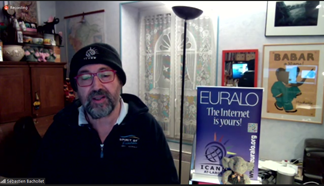
Here is the best dragon which is available under Creative Commons https://www.flickr.com/photos/34700343@N08/4271909571 Here are some that were officially released by LucasFilm with a Star Wars theme. https://www.starwars.com/news/star-wars-backgrounds From: Natalia Filina <filinafilka@gmail.com> Sent: Tuesday, October 13, 2020 2:14 PM To: Marita Moll <mmoll@ca.inter.net> Cc: Jonathan Zuck <JZuck@innovatorsnetwork.org>; At-Large Worldwide <at-large@atlarge-lists.icann.org> Subject: Re: [At-Large] A few suggestions for when you're on camera in ZOOM! Thank you very much for your recommendations, Jonathan! It is very nice to see EURALO Chairman as the great example!-) I also ask you to share the source of the background with the dragons!!!-))))🐉 Best, Natalia F. вт, 13 окт. 2020 г. в 15:56, Marita Moll <mmoll@ca.inter.net<mailto:mmoll@ca.inter.net>>: Great suggestions, JZ. I already decided not to use that background as it does get a bit shapeshifty. Seb was very well set up. Marita On 10/13/2020 7:46 AM, Jonathan Zuck wrote: Folks, Glad we’re getting started with our meetings. I think we’re off to a strong start so thank you for everyone involved. I noticed a couple of things that I thought I would mention to improve your camera feed on Zoom. 1. Align your camera. Often people are using the camera on their laptop to broadcast themselves but when you do this, you need to be careful. The best angle for the laptop screen for reading might NOT be the best angle for you on camera. Often, when the lid is too far back, you will be too low on camera. Something to check. You can go into Video Settings on Zoom to see how you look on camera. 2. Use a Green Screen While clever, the virtual background feature of Zoom is not very good and can be quite distracting when people are seeing parts of you disappear and reappear on camera. IF you have a green screen, the virtual backgrounds will look MUCH better! If you do not have a green screen, I my strong recommendation is not to use a virtual background. I never thought I would write these words but follow Sébastien’s example! He has simply created a nice space in his office, cleaned it up a bit, put up a sign, made it bright and it looks MUCH better than disappearing and reappearing. [A person standing in front of a computer Description automatically generated] If you really MUST use the virtual background feature, remember that it is using the difference in depth in your scene to determine what to include and not include. If possible, sit with a plain wall behind you, without a lot of extra stuff to confuse the camera and try to stay fairly still, so you remain the same distance to the camera. 1. Face the light. You’ll notice also in Sébastien’s example that he has a nice soft light on his face. When you have the brighter light behind you, you become a silhouette. Try to face a northern window or turn a light on in front of you, perhaps directing it at the wall in front of you if you’re facing a wall. Ideally, the brightest source of light in you scene is in front of you and bigger than your head. Just some thoughts I wanted to share with all of you who might be “on camera” in the next couple of weeks. Once again, great start! Jonathan Jonathan Zuck Executive Director Innovators Network Foundation www.InnovatorsNetwork.org<http://www.InnovatorsNetwork.org> _______________________________________________ At-Large mailing list At-Large@atlarge-lists.icann.org<mailto:At-Large@atlarge-lists.icann.org> https://atlarge-lists.icann.org/mailman/listinfo/at-large At-Large Official Site: http://atlarge.icann.org _______________________________________________ By submitting your personal data, you consent to the processing of your personal data for purposes of subscribing to this mailing list accordance with the ICANN Privacy Policy (https://www.icann.org/privacy/policy) and the website Terms of Service (https://www.icann.org/privacy/tos). You can visit the Mailman link above to change your membership status or configuration, including unsubscribing, setting digest-style delivery or disabling delivery altogether (e.g., for a vacation), and so on. _______________________________________________ At-Large mailing list At-Large@atlarge-lists.icann.org<mailto:At-Large@atlarge-lists.icann.org> https://atlarge-lists.icann.org/mailman/listinfo/at-large At-Large Official Site: http://atlarge.icann.org _______________________________________________ By submitting your personal data, you consent to the processing of your personal data for purposes of subscribing to this mailing list accordance with the ICANN Privacy Policy (https://www.icann.org/privacy/policy) and the website Terms of Service (https://www.icann.org/privacy/tos). You can visit the Mailman link above to change your membership status or configuration, including unsubscribing, setting digest-style delivery or disabling delivery altogether (e.g., for a vacation), and so on.

Dear Jonathan, any application for the ugly to see us as cute? Best Alberto De: At-Large <at-large-bounces@atlarge-lists.icann.org> En nombre de Natalia Filina Enviado el: martes, 13 de octubre de 2020 15:14 Para: Marita Moll <mmoll@ca.inter.net> CC: At-Large Worldwide <at-large@atlarge-lists.icann.org> Asunto: Re: [At-Large] A few suggestions for when you're on camera in ZOOM! Thank you very much for your recommendations, Jonathan! It is very nice to see EURALO Chairman as the great example!-) I also ask you to share the source of the background with the dragons!!!-))))🐉 Best, Natalia F. вт, 13 окт. 2020 г. в 15:56, Marita Moll <mmoll@ca.inter.net <mailto:mmoll@ca.inter.net> >: Great suggestions, JZ. I already decided not to use that background as it does get a bit shapeshifty. Seb was very well set up. Marita On 10/13/2020 7:46 AM, Jonathan Zuck wrote: Folks, Glad we’re getting started with our meetings. I think we’re off to a strong start so thank you for everyone involved. I noticed a couple of things that I thought I would mention to improve your camera feed on Zoom. 1. Align your camera. Often people are using the camera on their laptop to broadcast themselves but when you do this, you need to be careful. The best angle for the laptop screen for reading might NOT be the best angle for you on camera. Often, when the lid is too far back, you will be too low on camera. Something to check. You can go into Video Settings on Zoom to see how you look on camera. 2. Use a Green Screen While clever, the virtual background feature of Zoom is not very good and can be quite distracting when people are seeing parts of you disappear and reappear on camera. IF you have a green screen, the virtual backgrounds will look MUCH better! If you do not have a green screen, I my strong recommendation is not to use a virtual background. I never thought I would write these words but follow Sébastien’s example! He has simply created a nice space in his office, cleaned it up a bit, put up a sign, made it bright and it looks MUCH better than disappearing and reappearing. If you really MUST use the virtual background feature, remember that it is using the difference in depth in your scene to determine what to include and not include. If possible, sit with a plain wall behind you, without a lot of extra stuff to confuse the camera and try to stay fairly still, so you remain the same distance to the camera. 3. Face the light. You’ll notice also in Sébastien’s example that he has a nice soft light on his face. When you have the brighter light behind you, you become a silhouette. Try to face a northern window or turn a light on in front of you, perhaps directing it at the wall in front of you if you’re facing a wall. Ideally, the brightest source of light in you scene is in front of you and bigger than your head. Just some thoughts I wanted to share with all of you who might be “on camera” in the next couple of weeks. Once again, great start! Jonathan Jonathan Zuck Executive Director Innovators Network Foundation www.InnovatorsNetwork.org <http://www.InnovatorsNetwork.org> _______________________________________________ At-Large mailing list At-Large@atlarge-lists.icann.org <mailto:At-Large@atlarge-lists.icann.org> https://atlarge-lists.icann.org/mailman/listinfo/at-large At-Large Official Site: http://atlarge.icann.org _______________________________________________ By submitting your personal data, you consent to the processing of your personal data for purposes of subscribing to this mailing list accordance with the ICANN Privacy Policy (https://www.icann.org/privacy/policy) and the website Terms of Service (https://www.icann.org/privacy/tos). You can visit the Mailman link above to change your membership status or configuration, including unsubscribing, setting digest-style delivery or disabling delivery altogether (e.g., for a vacation), and so on. _______________________________________________ At-Large mailing list At-Large@atlarge-lists.icann.org <mailto:At-Large@atlarge-lists.icann.org> https://atlarge-lists.icann.org/mailman/listinfo/at-large At-Large Official Site: http://atlarge.icann.org _______________________________________________ By submitting your personal data, you consent to the processing of your personal data for purposes of subscribing to this mailing list accordance with the ICANN Privacy Policy (https://www.icann.org/privacy/policy) and the website Terms of Service (https://www.icann.org/privacy/tos). You can visit the Mailman link above to change your membership status or configuration, including unsubscribing, setting digest-style delivery or disabling delivery altogether (e.g., for a vacation), and so on.
The closest I have found is LoomieLive that allows you to replace your video with an Avatar! From: At-Large <at-large-bounces@atlarge-lists.icann.org> On Behalf Of alberto@soto.net.ar Sent: Tuesday, October 13, 2020 2:42 PM To: 'Natalia Filina' <filinafilka@gmail.com>; 'Marita Moll' <mmoll@ca.inter.net> Cc: 'At-Large Worldwide' <at-large@atlarge-lists.icann.org> Subject: Re: [At-Large] A few suggestions for when you're on camera in ZOOM! Dear Jonathan, any application for the ugly to see us as cute? Best Alberto De: At-Large <at-large-bounces@atlarge-lists.icann.org<mailto:at-large-bounces@atlarge-lists.icann.org>> En nombre de Natalia Filina Enviado el: martes, 13 de octubre de 2020 15:14 Para: Marita Moll <mmoll@ca.inter.net<mailto:mmoll@ca.inter.net>> CC: At-Large Worldwide <at-large@atlarge-lists.icann.org<mailto:at-large@atlarge-lists.icann.org>> Asunto: Re: [At-Large] A few suggestions for when you're on camera in ZOOM! Thank you very much for your recommendations, Jonathan! It is very nice to see EURALO Chairman as the great example!-) I also ask you to share the source of the background with the dragons!!!-))))🐉 Best, Natalia F. вт, 13 окт. 2020 г. в 15:56, Marita Moll <mmoll@ca.inter.net<mailto:mmoll@ca.inter.net>>: Great suggestions, JZ. I already decided not to use that background as it does get a bit shapeshifty. Seb was very well set up. Marita On 10/13/2020 7:46 AM, Jonathan Zuck wrote: Folks, Glad we’re getting started with our meetings. I think we’re off to a strong start so thank you for everyone involved. I noticed a couple of things that I thought I would mention to improve your camera feed on Zoom. 1. Align your camera. Often people are using the camera on their laptop to broadcast themselves but when you do this, you need to be careful. The best angle for the laptop screen for reading might NOT be the best angle for you on camera. Often, when the lid is too far back, you will be too low on camera. Something to check. You can go into Video Settings on Zoom to see how you look on camera. 2. Use a Green Screen While clever, the virtual background feature of Zoom is not very good and can be quite distracting when people are seeing parts of you disappear and reappear on camera. IF you have a green screen, the virtual backgrounds will look MUCH better! If you do not have a green screen, I my strong recommendation is not to use a virtual background. I never thought I would write these words but follow Sébastien’s example! He has simply created a nice space in his office, cleaned it up a bit, put up a sign, made it bright and it looks MUCH better than disappearing and reappearing. [A person standing in front of a computer Description automatically generated] If you really MUST use the virtual background feature, remember that it is using the difference in depth in your scene to determine what to include and not include. If possible, sit with a plain wall behind you, without a lot of extra stuff to confuse the camera and try to stay fairly still, so you remain the same distance to the camera. 1. Face the light. You’ll notice also in Sébastien’s example that he has a nice soft light on his face. When you have the brighter light behind you, you become a silhouette. Try to face a northern window or turn a light on in front of you, perhaps directing it at the wall in front of you if you’re facing a wall. Ideally, the brightest source of light in you scene is in front of you and bigger than your head. Just some thoughts I wanted to share with all of you who might be “on camera” in the next couple of weeks. Once again, great start! Jonathan Jonathan Zuck Executive Director Innovators Network Foundation www.InnovatorsNetwork.org<http://www.InnovatorsNetwork.org> _______________________________________________ At-Large mailing list At-Large@atlarge-lists.icann.org<mailto:At-Large@atlarge-lists.icann.org> https://atlarge-lists.icann.org/mailman/listinfo/at-large At-Large Official Site: http://atlarge.icann.org _______________________________________________ By submitting your personal data, you consent to the processing of your personal data for purposes of subscribing to this mailing list accordance with the ICANN Privacy Policy (https://www.icann.org/privacy/policy) and the website Terms of Service (https://www.icann.org/privacy/tos). You can visit the Mailman link above to change your membership status or configuration, including unsubscribing, setting digest-style delivery or disabling delivery altogether (e.g., for a vacation), and so on. _______________________________________________ At-Large mailing list At-Large@atlarge-lists.icann.org<mailto:At-Large@atlarge-lists.icann.org> https://atlarge-lists.icann.org/mailman/listinfo/at-large At-Large Official Site: http://atlarge.icann.org _______________________________________________ By submitting your personal data, you consent to the processing of your personal data for purposes of subscribing to this mailing list accordance with the ICANN Privacy Policy (https://www.icann.org/privacy/policy) and the website Terms of Service (https://www.icann.org/privacy/tos). You can visit the Mailman link above to change your membership status or configuration, including unsubscribing, setting digest-style delivery or disabling delivery altogether (e.g., for a vacation), and so on.
Thanks, it's a very good idea !! De: Jonathan Zuck <JZuck@innovatorsnetwork.org> Enviado el: martes, 13 de octubre de 2020 15:53 Para: alberto@soto.net.ar; 'Natalia Filina' <filinafilka@gmail.com>; 'Marita Moll' <mmoll@ca.inter.net> CC: 'At-Large Worldwide' <at-large@atlarge-lists.icann.org> Asunto: RE: [At-Large] A few suggestions for when you're on camera in ZOOM! The closest I have found is LoomieLive that allows you to replace your video with an Avatar! From: At-Large <at-large-bounces@atlarge-lists.icann.org <mailto:at-large-bounces@atlarge-lists.icann.org> > On Behalf Of alberto@soto.net.ar <mailto:alberto@soto.net.ar> Sent: Tuesday, October 13, 2020 2:42 PM To: 'Natalia Filina' <filinafilka@gmail.com <mailto:filinafilka@gmail.com> >; 'Marita Moll' <mmoll@ca.inter.net <mailto:mmoll@ca.inter.net> > Cc: 'At-Large Worldwide' <at-large@atlarge-lists.icann.org <mailto:at-large@atlarge-lists.icann.org> > Subject: Re: [At-Large] A few suggestions for when you're on camera in ZOOM! Dear Jonathan, any application for the ugly to see us as cute? Best Alberto De: At-Large <at-large-bounces@atlarge-lists.icann.org <mailto:at-large-bounces@atlarge-lists.icann.org> > En nombre de Natalia Filina Enviado el: martes, 13 de octubre de 2020 15:14 Para: Marita Moll <mmoll@ca.inter.net <mailto:mmoll@ca.inter.net> > CC: At-Large Worldwide <at-large@atlarge-lists.icann.org <mailto:at-large@atlarge-lists.icann.org> > Asunto: Re: [At-Large] A few suggestions for when you're on camera in ZOOM! Thank you very much for your recommendations, Jonathan! It is very nice to see EURALO Chairman as the great example!-) I also ask you to share the source of the background with the dragons!!!-))))🐉 Best, Natalia F. вт, 13 окт. 2020 г. в 15:56, Marita Moll <mmoll@ca.inter.net <mailto:mmoll@ca.inter.net> >: Great suggestions, JZ. I already decided not to use that background as it does get a bit shapeshifty. Seb was very well set up. Marita On 10/13/2020 7:46 AM, Jonathan Zuck wrote: Folks, Glad we’re getting started with our meetings. I think we’re off to a strong start so thank you for everyone involved. I noticed a couple of things that I thought I would mention to improve your camera feed on Zoom. 1. Align your camera. Often people are using the camera on their laptop to broadcast themselves but when you do this, you need to be careful. The best angle for the laptop screen for reading might NOT be the best angle for you on camera. Often, when the lid is too far back, you will be too low on camera. Something to check. You can go into Video Settings on Zoom to see how you look on camera. 2. Use a Green Screen While clever, the virtual background feature of Zoom is not very good and can be quite distracting when people are seeing parts of you disappear and reappear on camera. IF you have a green screen, the virtual backgrounds will look MUCH better! If you do not have a green screen, I my strong recommendation is not to use a virtual background. I never thought I would write these words but follow Sébastien’s example! He has simply created a nice space in his office, cleaned it up a bit, put up a sign, made it bright and it looks MUCH better than disappearing and reappearing. If you really MUST use the virtual background feature, remember that it is using the difference in depth in your scene to determine what to include and not include. If possible, sit with a plain wall behind you, without a lot of extra stuff to confuse the camera and try to stay fairly still, so you remain the same distance to the camera. 3. Face the light. You’ll notice also in Sébastien’s example that he has a nice soft light on his face. When you have the brighter light behind you, you become a silhouette. Try to face a northern window or turn a light on in front of you, perhaps directing it at the wall in front of you if you’re facing a wall. Ideally, the brightest source of light in you scene is in front of you and bigger than your head. Just some thoughts I wanted to share with all of you who might be “on camera” in the next couple of weeks. Once again, great start! Jonathan Jonathan Zuck Executive Director Innovators Network Foundation www.InnovatorsNetwork.org <http://www.InnovatorsNetwork.org> _______________________________________________ At-Large mailing list At-Large@atlarge-lists.icann.org <mailto:At-Large@atlarge-lists.icann.org> https://atlarge-lists.icann.org/mailman/listinfo/at-large At-Large Official Site: http://atlarge.icann.org _______________________________________________ By submitting your personal data, you consent to the processing of your personal data for purposes of subscribing to this mailing list accordance with the ICANN Privacy Policy (https://www.icann.org/privacy/policy) and the website Terms of Service (https://www.icann.org/privacy/tos). You can visit the Mailman link above to change your membership status or configuration, including unsubscribing, setting digest-style delivery or disabling delivery altogether (e.g., for a vacation), and so on. _______________________________________________ At-Large mailing list At-Large@atlarge-lists.icann.org <mailto:At-Large@atlarge-lists.icann.org> https://atlarge-lists.icann.org/mailman/listinfo/at-large At-Large Official Site: http://atlarge.icann.org _______________________________________________ By submitting your personal data, you consent to the processing of your personal data for purposes of subscribing to this mailing list accordance with the ICANN Privacy Policy (https://www.icann.org/privacy/policy) and the website Terms of Service (https://www.icann.org/privacy/tos). You can visit the Mailman link above to change your membership status or configuration, including unsubscribing, setting digest-style delivery or disabling delivery altogether (e.g., for a vacation), and so on.

I've done a lot of video conference stuff and have learned a few lessons: 1. Often most of the actual useful content of these video conferences is in the audio. Try to be in a quiet place with minimal hard surfaces on walls and floors. I have found that the best way to get good audio without breakup is for as many users as possible to avoid having an open sound path between their speakers and their microphone. It is really bad when the microphone can hear the speakers - the software has to work hard to fix things, and often does so rather badly. A good way to get rid of that path is to use ear buds rather than speakers, even better if the buds have a microphone widget built in. The best way is to use a full earpiece/mouthpiece setup (I've got a nice Plantronics/Poly call-center USB headset with noise-cancellation - it isn't cheap, about $150 USD - but well worth it.) As an alternative I've found it useful to wear a full two-ear covering set of headphones and a good directional microphone with wind screen or foam filter. 2. Be extremely polite and try to avoid beginning to talk until the prior person is finished. (This can be hard given the delays that are natural to these kinds of conferences.) 3. I've found that software such as Manycam on Windows and Mac (I can't remember the name of the near equivalent on Linux) are really useful if you want to overlay text on the video or cut between screen and camera images or sound sources. These tools can burn a lot of CPU, so you may need a machine with at least a recent i5 4-core processor (or better, and a good, but quiet, processor cooler - my poor old Macbook tends to get rather warm when I do this.) --karl--

Karl, indeed 95% or more of the information content is carried by speech/voice. Videoconferencing from 1993/1995 (H.320, V-Tel era) had to solve the echo-suppression problem before it worked on image where there is no serious problem with delay due to transmission and most importantly signal processing. Why set up a videoconference in which 80% of the participants will show only their names or a fixed image? Where did all those years of all-night voice teleconferencing go and what did they teach us? Also look at a piece of software called Beulr which is said to be a bot able to attend zoom classes instead of you. Not to say past times were better, only to emphasize the need for reasonable behavior. Amazing, though, that we are once again spending so many cycles on proper Power Point... Alejandro Pisanty ________________________________________ De: At-Large <at-large-bounces@atlarge-lists.icann.org> en nombre de Karl Auerbach <karl@cavebear.com> Enviado: martes, 13 de octubre de 2020 03:08 p. m. Para: at-large@atlarge-lists.icann.org Asunto: Re: [At-Large] A few suggestions for when you're on camera in ZOOM! I've done a lot of video conference stuff and have learned a few lessons: 1. Often most of the actual useful content of these video conferences is in the audio. Try to be in a quiet place with minimal hard surfaces on walls and floors. I have found that the best way to get good audio without breakup is for as many users as possible to avoid having an open sound path between their speakers and their microphone. It is really bad when the microphone can hear the speakers - the software has to work hard to fix things, and often does so rather badly. A good way to get rid of that path is to use ear buds rather than speakers, even better if the buds have a microphone widget built in. The best way is to use a full earpiece/mouthpiece setup (I've got a nice Plantronics/Poly call-center USB headset with noise-cancellation - it isn't cheap, about $150 USD - but well worth it.) As an alternative I've found it useful to wear a full two-ear covering set of headphones and a good directional microphone with wind screen or foam filter. 2. Be extremely polite and try to avoid beginning to talk until the prior person is finished. (This can be hard given the delays that are natural to these kinds of conferences.) 3. I've found that software such as Manycam on Windows and Mac (I can't remember the name of the near equivalent on Linux) are really useful if you want to overlay text on the video or cut between screen and camera images or sound sources. These tools can burn a lot of CPU, so you may need a machine with at least a recent i5 4-core processor (or better, and a good, but quiet, processor cooler - my poor old Macbook tends to get rather warm when I do this.) --karl-- _______________________________________________ At-Large mailing list At-Large@atlarge-lists.icann.org https://atlarge-lists.icann.org/mailman/listinfo/at-large At-Large Official Site: http://atlarge.icann.org _______________________________________________ By submitting your personal data, you consent to the processing of your personal data for purposes of subscribing to this mailing list accordance with the ICANN Privacy Policy (https://www.icann.org/privacy/policy) and the website Terms of Service (https://www.icann.org/privacy/tos). You can visit the Mailman link above to change your membership status or configuration, including unsubscribing, setting digest-style delivery or disabling delivery altogether (e.g., for a vacation), and so on.
participants (6)
-
 alberto@soto.net.ar
 -
 Dr. Alejandro Pisanty Baruch
 -
 Jonathan Zuck
 -
 Karl Auerbach
 -
 Marita Moll
 -
 Natalia Filina