Webinar Chat: Followup #2

Dear Colleagues: I mentioned previously that we can activate the *Chat feature* and can actually have a conversation on the Chat pod. How? - Select: *All panelist and Attendees* - Use @Your name (if you wish to initiate or participate in a chat conversation) followed by your <question> or <Comment> *NOTES*: 1. Only the *host & co-host* can see a complete list of attendees. So, this is a workaround. 2. We need to keep in mind that the whole purpose of using the Webinar feature is to offer a more organized scenario. 3. The Q&A pod can be available as well to have the speaker/s and/or moderators assist in collecting the adequate questions that might need answering as the webinar proceeds. Screen # 1: What Host, Co-Host/Panelist see. [image: image.png] Screen # 2: Is the list of attendees seen by Host, co-host [image: image.png] Screen # 3: All panelist and Attendees see questions/coments in Webinar Chat Pod. [image: image.png] Screen # 4: The last entry is directed only to panelists. [image: image.png] Screen # 5A Q&A Pod, seen only by Host & co-host with the caveat to answer the question live (activate microphone feature). [image: image.png] Screen 5B: I hope this helps to make an informed decision. Kind regards, [image: photo] *Alfredo Calderon* eLearning Consultant calderon.alfredo@gmail.com http://aprendizajedistancia.blogspot.com | Skype: Alfredo_1212 <#m_8454187682499210852_SignatureSanitizer_SafeHtmlFilter_> | wiseintro.co/alfredocalderon <http://facebook.com/calderon.alfredo> <http://pr.linkedin.com/in/acalderon52> <http://twitter.com/acalderon52> <http://plus.google.com/u/0/103289446075444313762/posts> <http://www.pinterest.com/acalderon/> <http://www.slideshare.net/acalderon> <http://klout.com/#/acalderon52> <http://wiseintro.co/alfredocalderon> IMPORTANT: The contents of this email and any attachments are confidential. They are intended for the named recipient(s) only. If you have received this email by mistake, please notify the sender immediately and do not disclose the contents to anyone or make copies thereof. Get your own email signature <https://www.wisestamp.com/signature-in-email?utm_source=promotion&utm_medium...> [image: Mailtrack] <https://mailtrack.io?utm_source=gmail&utm_medium=signature&utm_campaign=sign...> Sender notified by Mailtrack <https://mailtrack.io?utm_source=gmail&utm_medium=signature&utm_campaign=sign...> 04/17/20, 11:12:35 AM

Thank you Alfredo for this information Hadia From: Cbwg-webinars [mailto:cbwg-webinars-bounces@icann.org] On Behalf Of Alfredo Calderon Sent: Friday, April 17, 2020 5:13 PM To: cbwg-webinars@icann.org; ICANN At-Large Staff Cc: Hadia El Miniawi; Joanna Subject: [Cbwg-webinars] Webinar Chat: Followup #2 Dear Colleagues: I mentioned previously that we can activate the Chat feature and can actually have a conversation on the Chat pod. How? * Select: All panelist and Attendees * Use @Your name (if you wish to initiate or participate in a chat conversation) followed by your <question> or <Comment> NOTES: 1. Only the host & co-host can see a complete list of attendees. So, this is a workaround. 2. We need to keep in mind that the whole purpose of using the Webinar feature is to offer a more organized scenario. 3. The Q&A pod can be available as well to have the speaker/s and/or moderators assist in collecting the adequate questions that might need answering as the webinar proceeds. Screen # 1: What Host, Co-Host/Panelist see. [image.png] Screen # 2: Is the list of attendees seen by Host, co-host [image.png] Screen # 3: All panelist and Attendees see questions/coments in Webinar Chat Pod. [image.png] Screen # 4: The last entry is directed only to panelists. [image.png] Screen # 5A Q&A Pod, seen only by Host & co-host with the caveat to answer the question live (activate microphone feature). [image.png] Screen 5B: I hope this helps to make an informed decision. Kind regards, [photo] Alfredo Calderon eLearning Consultant calderon.alfredo@gmail.com<mailto:calderon.alfredo@gmail.com> http://aprendizajedistancia.blogspot.com | Skype: Alfredo_1212 | wiseintro.co/alfredocalderon<http://wiseintro.co/alfredocalderon> [https://cdn.gifo.wisestamp.com/social/facebook/3b5998/16/0.png]<http://facebook.com/calderon.alfredo> [https://cdn.gifo.wisestamp.com/social/linkedin/0077b5/16/0.png]<http://pr.linkedin.com/in/acalderon52> [https://cdn.gifo.wisestamp.com/social/twitter/55acee/16/0.png]<http://twitter.com/acalderon52> [https://cdn.gifo.wisestamp.com/social/googleplus/dc4e41/16/0.png]<http://plus.google.com/u/0/103289446075444313762/posts> [https://cdn.gifo.wisestamp.com/social/pinterest/bd081c/16/0.png]<http://www.pinterest.com/acalderon/> [https://cdn.gifo.wisestamp.com/social/slideshare/0077b5/16/0.png]<http://www.slideshare.net/acalderon> [https://cdn.gifo.wisestamp.com/social/klout/e44803/16/0.png]<http://klout.com/#/acalderon52> [https://cdn.gifo.wisestamp.com/social/wiseintro/1CB7EB/16/0.png]<http://wiseintro.co/alfredocalderon> IMPORTANT: The contents of this email and any attachments are confidential. They are intended for the named recipient(s) only. If you have received this email by mistake, please notify the sender immediately and do not disclose the contents to anyone or make copies thereof. Get your own [https://s3.amazonaws.com/landing.wisestamp.com/7effb49f0d4783ce39b02e49dd2e3...] email signature<https://www.wisestamp.com/signature-in-email?utm_source=promotion&utm_medium...> [Mailtrack]<https://mailtrack.io?utm_source=gmail&utm_medium=signature&utm_campaign=sign...> Sender notified by Mailtrack<https://mailtrack.io?utm_source=gmail&utm_medium=signature&utm_campaign=sign...> 04/17/20, 11:12:35 AM [https://mailtrack.io/trace/mail/3a8df65aa6546d5d7150e94becf36e281feebee0.png...]
My pleasure. [image: photo] *Alfredo Calderon* eLearning Consultant calderon.alfredo@gmail.com http://aprendizajedistancia.blogspot.com | Skype: Alfredo_1212 <#SignatureSanitizer_SafeHtmlFilter_> | wiseintro.co/alfredocalderon <http://facebook.com/calderon.alfredo> <http://pr.linkedin.com/in/acalderon52> <http://twitter.com/acalderon52> <http://plus.google.com/u/0/103289446075444313762/posts> <http://www.pinterest.com/acalderon/> <http://www.slideshare.net/acalderon> <http://klout.com/#/acalderon52> <http://wiseintro.co/alfredocalderon> IMPORTANT: The contents of this email and any attachments are confidential. They are intended for the named recipient(s) only. If you have received this email by mistake, please notify the sender immediately and do not disclose the contents to anyone or make copies thereof. Get your own email signature <https://www.wisestamp.com/signature-in-email?utm_source=promotion&utm_medium...> On Tue, Apr 21, 2020 at 9:06 AM Hadia Abdelsalam Mokhtar EL miniawi < Hadia@tra.gov.eg> wrote:
Thank you Alfredo for this information
Hadia
*From:* Cbwg-webinars [mailto:cbwg-webinars-bounces@icann.org] *On Behalf Of *Alfredo Calderon *Sent:* Friday, April 17, 2020 5:13 PM *To:* cbwg-webinars@icann.org; ICANN At-Large Staff *Cc:* Hadia El Miniawi; Joanna *Subject:* [Cbwg-webinars] Webinar Chat: Followup #2
Dear Colleagues:
I mentioned previously that we can activate the *Chat feature* and can actually have a conversation on the Chat pod. How?
- Select: *All panelist and Attendees* - Use @Your name (if you wish to initiate or participate in a chat conversation) followed by your <question> or <Comment>
*NOTES*:
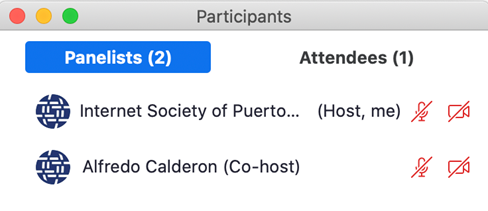
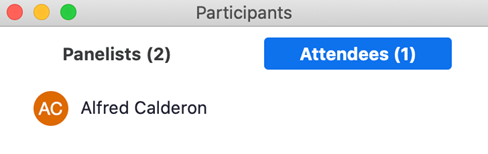
1. Only the *host & co-host* can see a complete list of attendees. So, this is a workaround. 2. We need to keep in mind that the whole purpose of using the Webinar feature is to offer a more organized scenario. 3. The Q&A pod can be available as well to have the speaker/s and/or moderators assist in collecting the adequate questions that might need answering as the webinar proceeds.
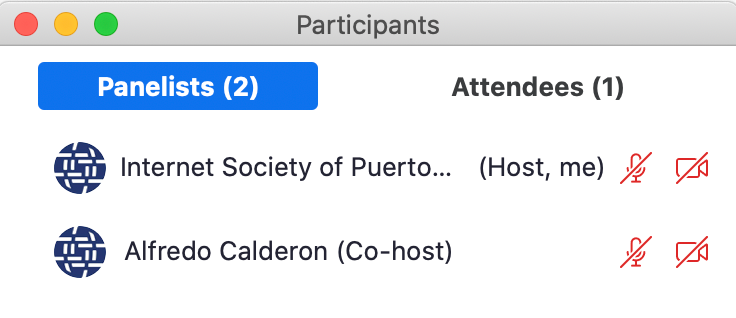
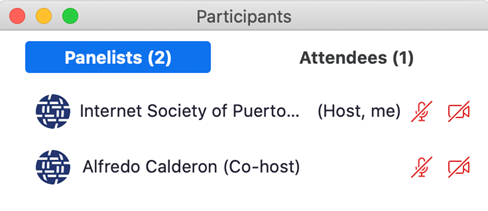
Screen # 1: What Host, Co-Host/Panelist see.
[image: image.png]
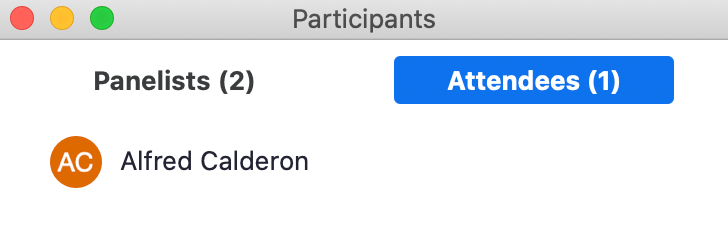
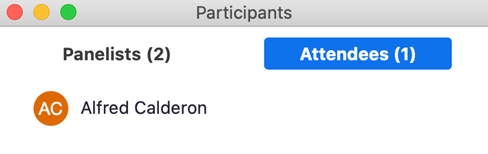
Screen # 2: Is the list of attendees seen by Host, co-host
[image: image.png]
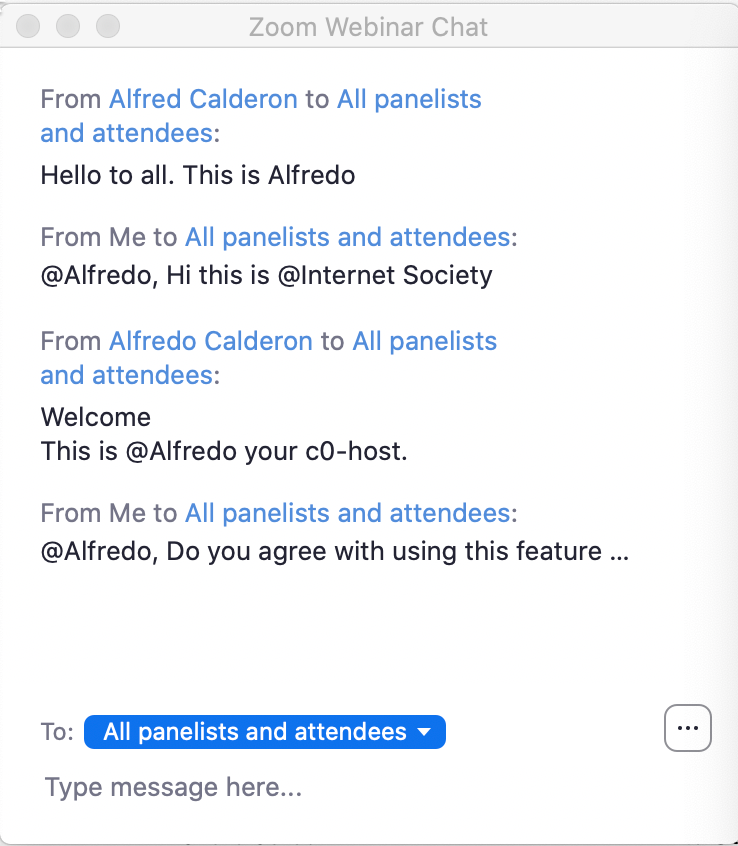
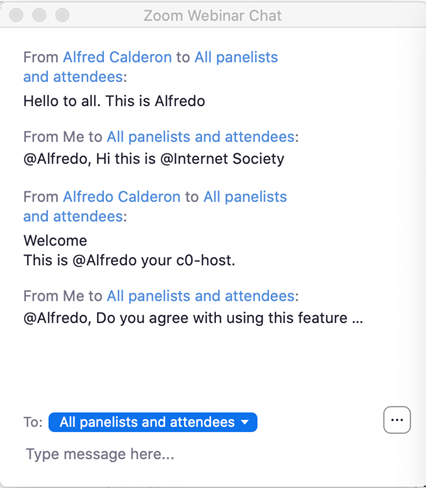
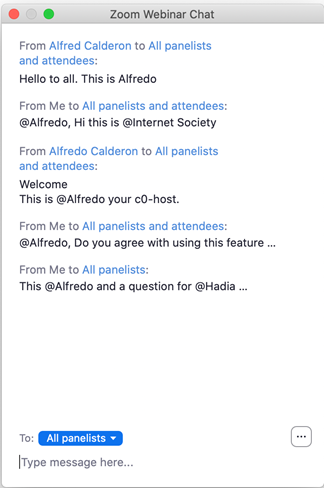
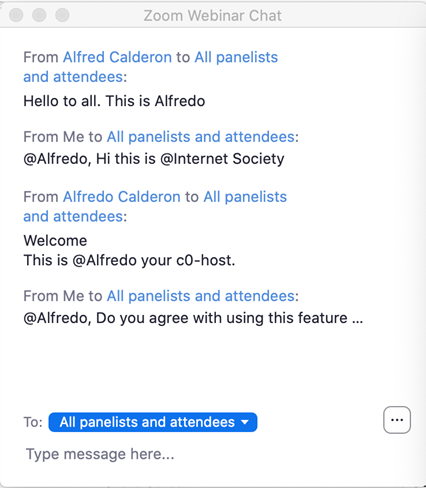
Screen # 3: All panelist and Attendees see questions/coments in Webinar Chat Pod.
[image: image.png]
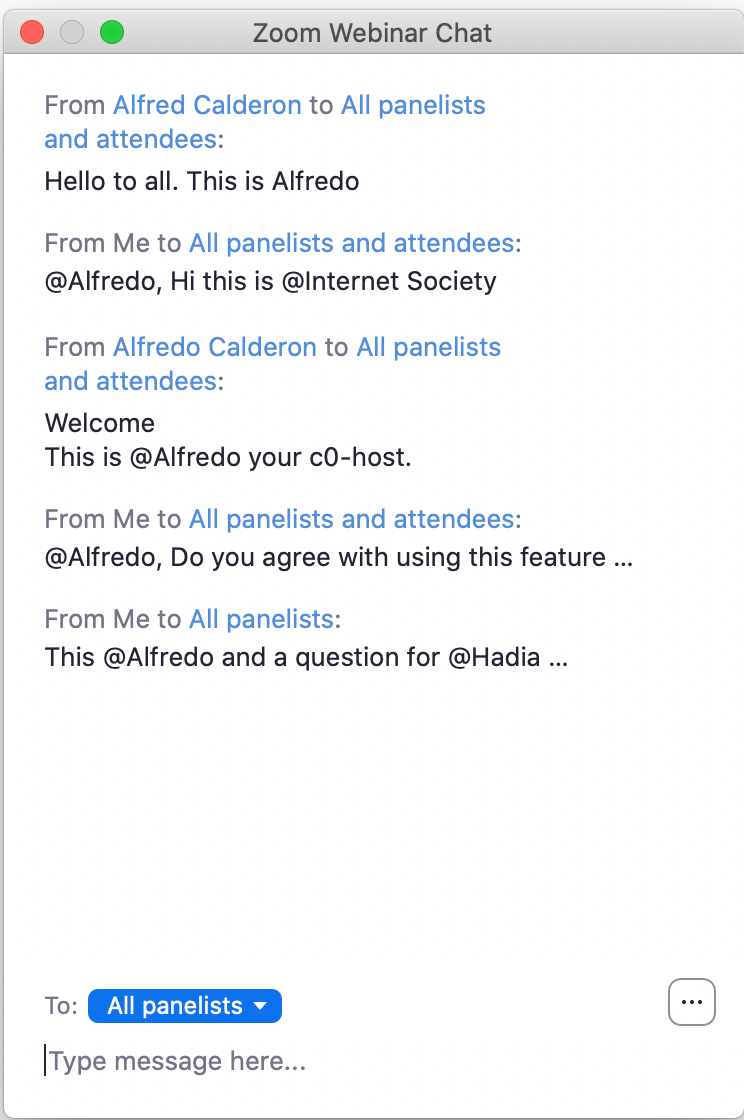
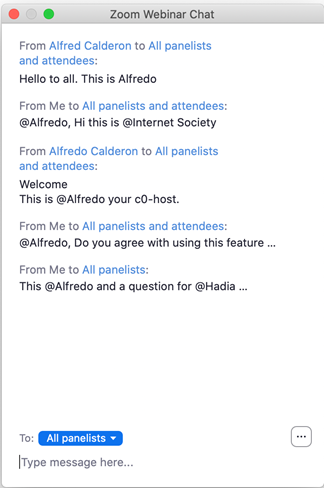
Screen # 4: The last entry is directed only to panelists.
[image: image.png]
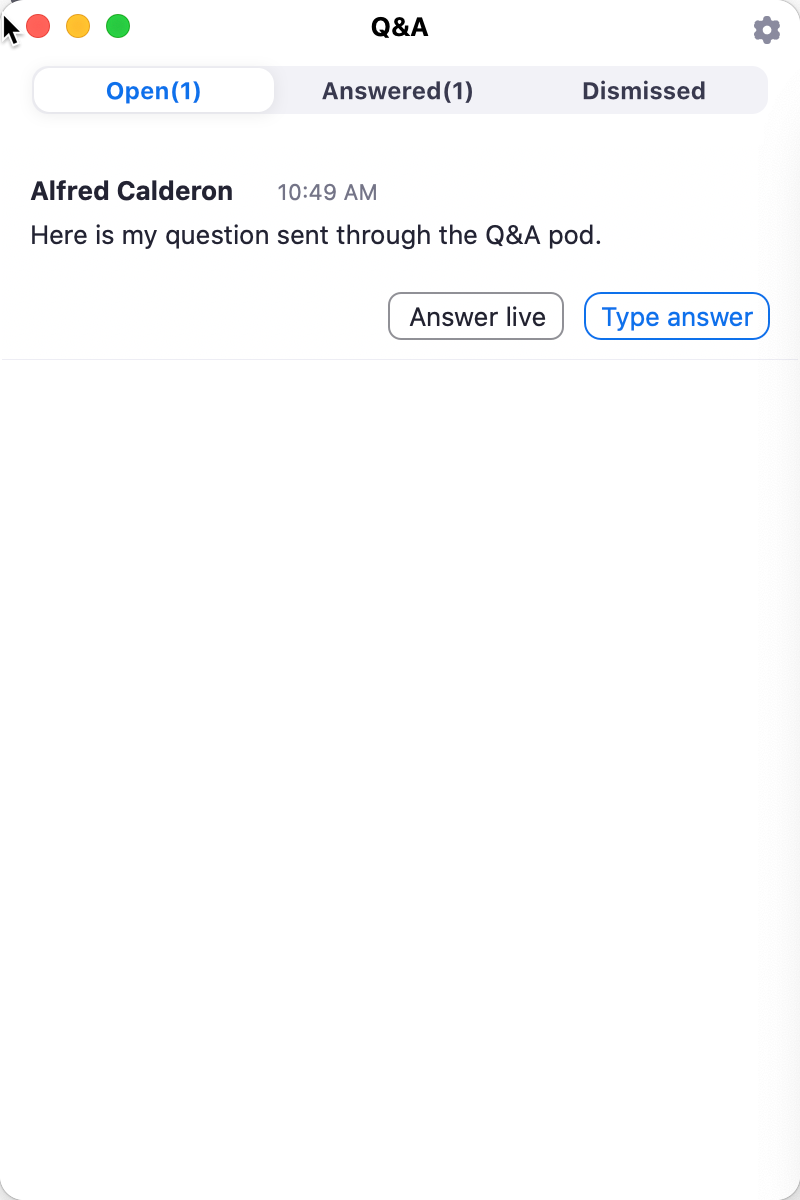
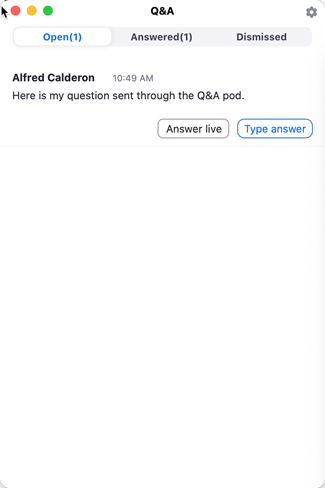
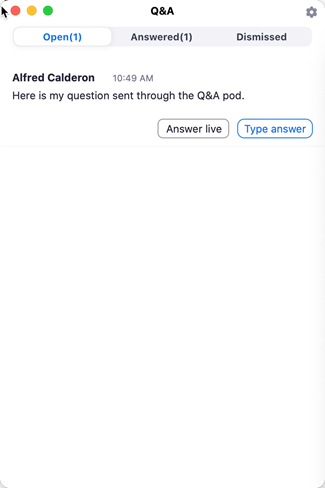
Screen # 5A Q&A Pod, seen only by Host & co-host with the caveat to answer the question live (activate microphone feature).
[image: image.png]
Screen 5B:
I hope this helps to make an informed decision.
Kind regards,
[image: photo]
*Alfredo Calderon* eLearning Consultant
calderon.alfredo@gmail.com
http://aprendizajedistancia.blogspot.com | Skype: Alfredo_1212 <#m_7683501990810793380_m_8454187682499210852_SignatureSanitize>
| wiseintro.co/alfredocalderon
<http://facebook.com/calderon.alfredo>
<http://pr.linkedin.com/in/acalderon52>
<http://twitter.com/acalderon52>
<http://plus.google.com/u/0/103289446075444313762/posts>
<http://www.pinterest.com/acalderon/>
<http://www.slideshare.net/acalderon>
<http://klout.com/#/acalderon52>
<http://wiseintro.co/alfredocalderon>
IMPORTANT: The contents of this email and any attachments are confidential. They are intended for the named recipient(s) only. If you have received this email by mistake, please notify the sender immediately and do not disclose the contents to anyone or make copies thereof.
Get your own email signature <https://www.wisestamp.com/signature-in-email?utm_source=promotion&utm_medium...>
[image: Mailtrack] <https://mailtrack.io?utm_source=gmail&utm_medium=signature&utm_campaign=sign...>
Sender notified by Mailtrack <https://mailtrack.io?utm_source=gmail&utm_medium=signature&utm_campaign=sign...> 04/17/20, 11:12:35 AM
participants (2)
-
 Alfredo Calderon
 -
 Hadia Abdelsalam Mokhtar EL miniawi