Adobe Room Updates - Flash Player & Adobe Connect Add-Ins

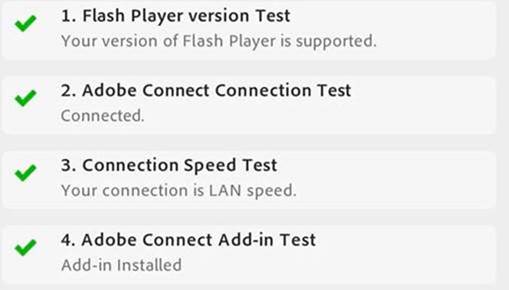
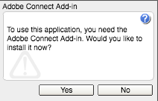
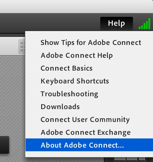
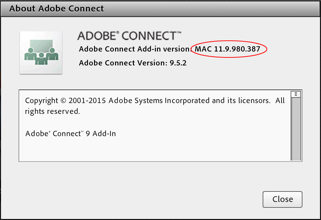
Hi All – In light of some of the technical issues experienced on today’s call with the Adobe Room, we wanted to make sure that everyone has the newest Flash Player and the latest Adobe Connect Add-Ins installed. The immediate link below will assist with testing your system. When you proceed, you may wish to do so at least 24 hours before next Plenary call. This way, all installs have time to sync properly. Go to http://admin.adobeconnect.com/common/help/en/support/meeting_test.htm Install the newest Flash Player, install Adobe Connect Add-in and perform the test. You should get something like this: [cid:image003.jpg@01D32BE9.557E6F00] More screenshots below for Add-Ins... * Upon entering a meeting room, you will be prompted to install the Add-in with a Flash dialog box. [cid:image004.png@01D32BEC.A50C9DA0] * Hit Yes to install, and your meeting should launch automatically once the installation is complete. * You may see a bar populate near the top of your browser, asking you to Allow or Deny participate.icann.org to use Flash. If so, hit Allow. * To verify that you are now on the correct, updated version, go to the Help menu at the top right of a meeting room, and select About Adobe Connect. [cid:image005.png@01D32BEC.A50C9DA0] * Your Adobe Connect Add-in Version should be either MAC 11.9.980.387 or WIN 11.9.980.387, depending on if you are on a Mac or Windows machine [cid:image006.png@01D32BEC.A50C9DA0] Kind Regards, Yvette Guigneaux (MSSI) Multistakeholder Strategy & Strategic Initiatives Projects & Operations Assistant. ICANN – Internet Corporation for Assigned Names and Numbers Email: yvette.guigneaux@icann.org<mailto:yvette.guigneaux@icann.org> Cell: +1-310-460-8432 Skype: yvette.guigneaux.icann www.icann.org<http://www.icann.org/> [cid:image001.png@01D32BEA.60D2DD90]

participants (1)
-
 MSSI Secretariat