Dear Dev I am in a work session. I drew some paths of image. I am sharing in vectors, very scalable. format file .svg (native vectors) The next steps are easy. Select paths and add color separately. I would like have much more time to help but I am full. I hope will be useful Regards On Thu, Mar 2, 2017 at 9:21 AM, Dev Anand Teelucksingh <devtee@gmail.com> wrote:
Dear All,
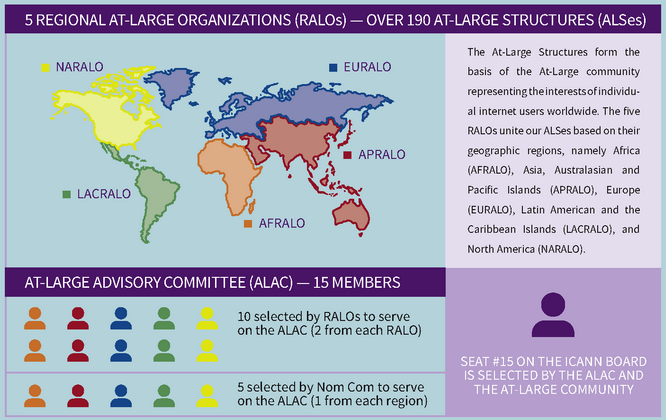
In updating the slides for the Introduction to At-Large, the current slide has the old At-Large Organisational Diagram https://www.dropbox.com/s/zj62i0l9cj8j52k/at-large-org-diagram-old.png
The At-Large Brochure has a better At-Large orgnaisational diagram - see https://www.dropbox.com/s/vsb6oq8qgmkjlfx/at-large-org-diagram.png but this diagram doesn't exist for insertion as a full page slide on a white background like the old organisational diagram without significant blurring and using a non-white background.
Can someone assist by either recreating the organisational diagram https://www.dropbox.com/s/vsb6oq8qgmkjlfx/at-large-org-diagram.png in Google Slides OR create a large enough image with a white background
You can edit the At-Large Organisational diagram at https://docs.google.com/presentation/d/1r5OYV0QzoHbGVXkLFLNKVC42NlrJO 6cDA_H7rc110WM/edit?usp=sharing (no Google signin needed)
Dev Anand
_______________________________________________ Alac-sc-outreach mailing list Alac-sc-outreach@atlarge-lists.icann.org https://mm.icann.org/mailman/listinfo/alac-sc-outreach