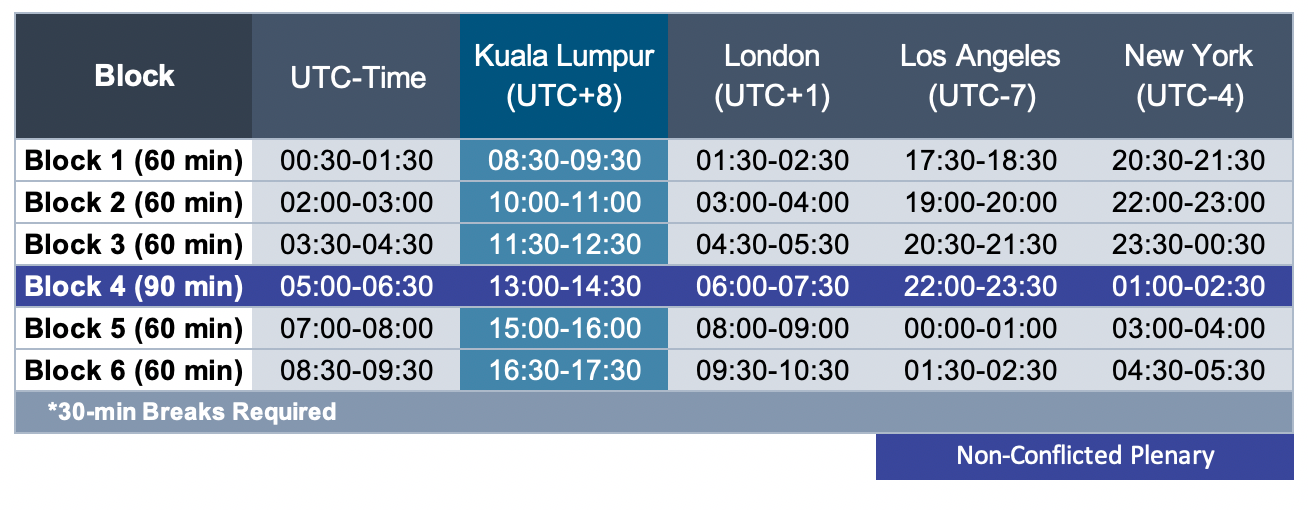
Dear all, Please note that Council meeting is included in overview below from Kim. Also included is the explenation how to add the session which is relevant to you to your agenda. The reason to do it this way is to ensure that you also are able to connect to the correct zoom room Kind regards, Bart From: Ccnso-council <ccnso-council-bounces@icann.org> on behalf of Kimberly Carlson <kimberly.carlson@icann.org> Date: Thursday, 18 June 2020 at 02:04 To: "cctldcommunity@cctld-managers.org" <ccTLDcommunity@cctld-managers.org>, "ccnso-members@icann.org" <ccnso-members@icann.org> Cc: "ccNSO-Council@icann.org" <ccNSO-Council@icann.org> Subject: [ccnso-council] ccNSO-related sessions at ICANN68 Virtual Policy Forum and remote participation details Dear all, The ccNSO-related sessions at ICANN68 Policy forum can be found below and on the wiki: https://community.icann.org/x/MjGJBw In addition to this, you can download all the ccNSO-related session to your own calendar. Step 1 - Create a profile and your personalized ICANN68 schedule (https://68.schedule.icann.org/ [68.schedule.icann.org]) Go to the Meeting Schedule webpage and create a profile and login. Every session on the Full Agenda can be selected and added to your individual schedule by clicking the (blue ‘+’ box) in the upper right corner of each meeting. This adds it to your individual schedule, My Agenda, which you can then add to your calendar. See next step. Step 2 - To import your schedule into your calendar: once you’ve added all your chosen meetings to your schedule, click on (View My Agenda) Click the down arrow next to Export Select Export My Agenda (ics) Open the exported meetings .ics and add to your chosen calendar For Microsoft Outlook, right-click on the exported meetings .ics file and choose Show in Folder Right-click on the file, and select Open with Microsoft Outlook. Save & Close. Note: Your Agenda can only be exported from the desktop app; the ICANN68 phone app does not offer this feature PLEASE ENSURE YOU HAVE UPDATED YOUR ZOOM APP TO THE LATEST VERSION (5.0) TO ACCESS ICANN68 SESSIONS. Please download the latest Zoom app [zoom.us] on your participation device (mobile or desktop computer). Day 1, Monday, 22 June DNSSEC Workshop [68.schedule.icann.org] - 10:00-12:30 (blocks 2, 3) Zoom Meeting Link: https://icann.zoom.us/j/95790034403 [icann.zoom.us] | Meeting ID: 957 9003 440 Tech Day [68.schedule.icann.org] –1500-17:30 (blocks 5, 6) (07:00-9:30 UTC) Zoom Meeting Link: https://icann.zoom.us/j/91333886398 [icann.zoom.us] | Meeting ID: 913 3388 6398 Day 2, Tuesday, 23 June Members Meeting: Governance Models ccTLDs – 15:00–17:30 (blocks 5, 6) Zoom Meeting Link: https://icann.zoom.us/j/95790034403 [icann.zoom.us] Plenary Session: The DNS and the Internet of Things – 13:00-14:30 (05:00-6:30 UTC) Zoom Meeting Link: https://icann.zoom.us/j/92051842416 [icann.zoom.us] | Meeting ID: 920 5184 2416 ccNSO Virtual Cocktail – 18:00-1900 (additional details to follow) Day 3, Wednesday, 24 June Members meeting: ccTLDs & Covid19 830-11:00 (blocks 1, 2) Zoom Meeting Link: https://icann.zoom.us/j/95790034403 [icann.zoom.us] Joint session: ccNSO and GNSO Councils [68.schedule.icann.org] – 1130-12:30 (block 3) Zoom Meeting Link: https://icann.zoom.us/j/91346707982 [icann.zoom.us] | Meeting ID: 913 4670 7982 ccNSO Council Public Meeting [68.schedule.icann.org] – 15:00-16:00 (block 5) (0700-08:00 UTC) Zoom Meeting Link: https://icann.zoom.us/j/95790034403 [icann.zoom.us] | Meeting ID: 957 9003 4403 iglc 1630-1730 block 6 Zoom meeting link: https://icann.zoom.us/j/95790034403 [icann.zoom.us] Day 4, Thursday, 25 June Strategic & Operational Planning Standing Committee (SOPC) [68.schedule.icann.org] – 15:00-16:00 (block 5) (07:00-08:00 UTC) Zoom Meeting Link: https://icann.zoom.us/j/95790034403 [icann.zoom.us] | Meeting ID: 957 9003 4403 Members meeting: Q&A – ccNSO Appointed Board members – 1630-1730 (block 6) Zoom Meeting Link: https://icann.zoom.us/j/95790034403 [icann.zoom.us] | Meeting ID: 957 9003 4403 ccNSO schedule wiki: https://community.icann.org/x/MjGJBw Tech Day agenda: https://community.icann.org/x/L4IEC Calendar invites will be sent to WG/Committee members and those who request them.