AC Room Connectivity - SSR2 Review Team - Meeting #33 | 14:00 UTC | Tuesday, 24 October 2017

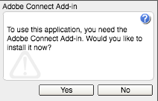
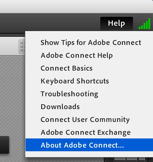
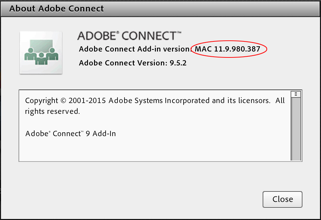
Hello SSR2 Review Team - Good day. Just touching base regarding connectivity for our next SSR2 Review Team - Meeting #33 | 14:00 UTC | Tuesday, 24 October 2017. In light of the audio/connection issues experienced on SSR2 Plenary calls recently, below are some suggested solutions... * Connect to the Adobe Room early - (https://participate.icann.org/ssrreview) 20-30 minutes before the scheduled call, the Adobe Connect room will be open and I will be available to assist you - in addition we can resolve any microphone/static/connection issues ahead of time - including connecting with international operators if need be. The goal is to have all connection concerns resolved by the top of the hour for the benefit of the team. * Feel free to Skype me either before, during or after the call - my skype address is yvette.guigneaux.icann - this way I can respond to you almost immediately for whatever you may need. * Allow the AC Room to dial out to you when you sign in - this audio method is connected to the sound bridge in the AC Room and therefore tends to remain more consistent throughout the call. Please see slide attached for visual tutorial. * Please (if possible) avoid using Adobe Room speakers - the audio is not reliable, tends to create an echo and cuts out without warning - thus your comments and questions are incomplete or may be not heard for the record. * Be located (if possible) in an area that has proper broadband connection and is quiet - thus creating a strong signal connection, making it possible to see and hear in the Adobe Connect Room. * Please make sure you have the newest Flash Player and the latest Adobe Connect Add-Ins installed - please do at least 24 hours prior to the call to insure all has time to sync properly. Go to http://admin.adobeconnect.com/common/help/en/support/meeting_test.htm ? Install the newest Flash Player, install Adobe Connect Add-in and perform the test. You should get something like this: [cid:image003.jpg@01D34C16.8709BC30] More screenshots below for Add-Ins... * Upon entering a meeting room, you will be prompted to install the Add-in with a Flash dialog box. [cid:image004.png@01D34C15.8F935CE0] * Hit Yes to install, and your meeting should launch automatically once the installation is complete. * You may see a bar populate near the top of your browser, asking you to Allow or Deny participate.icann.org to use Flash. If so, hit Allow. * To verify that you are now on the correct, updated version, go to the Help menu at the top right of a meeting room, and select About Adobe Connect. [cid:image005.png@01D34C15.8F935CE0] * Your Adobe Connect Add-in Version should be either MAC 11.9.980.387 or WIN 11.9.980.387, depending on if you are on a Mac or Windows machine * [cid:image006.png@01D34C15.8F935CE0] As your SSR2 Review Team Secretariat, I am determined to create an atmosphere where you can clearly participate in the Adobe Connect Room. Thank you everyone and I look forward to seeing you all on our upcoming call. Kind Regards, Yvette Guigneaux (MSSI) Multistakeholder Strategy & Strategic Initiatives Projects & Operations Assistant. ICANN - Internet Corporation for Assigned Names and Numbers Email: yvette.guigneaux@icann.org Cell: +1-310-460-8432 Skype: yvette.guigneaux.icann www.icann.org<http://www.icann.org/> [cid:image001.png@01D34326.60C55640]


participants (1)
-
 MSSI Secretariat